Software Development
How AI and Automation Are Changing Business Software Development
Where AI genuinely helps business software today, where it does not, and how to automate workflows without losing control.
- By Innovix Solutions LLC
- 7 min read
Few technologies have generated as much excitement, and as much confusion, as artificial intelligence. Business owners hear that AI will transform everything, then try a chatbot that confidently invents an answer. Both experiences are real.
The practical picture sits between the hype and the skepticism. AI in software development is changing two things at once: how software is built, and what business software can do. This article separates the useful from the overpromised, explains where automation fits, and lays out a responsible way to start.
Two different conversations about AI
When people talk about AI and software, they usually mean one of two things.
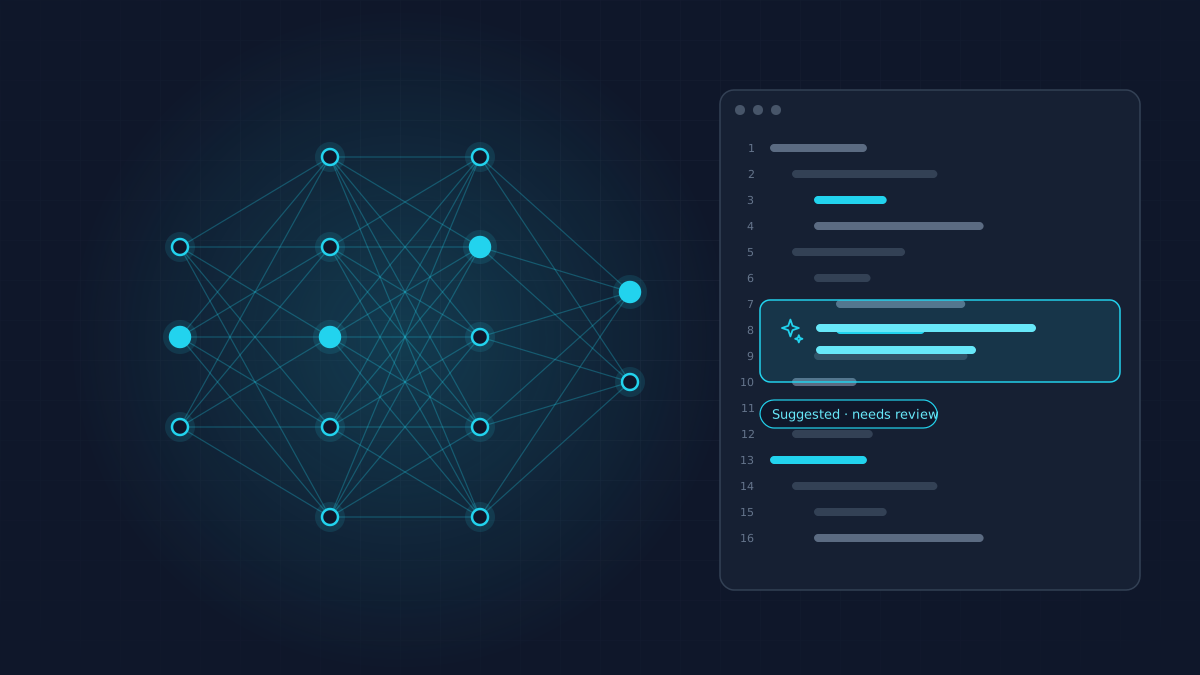
AI that helps build software. Developers use AI assistants to suggest code, explain unfamiliar code, generate tests and draft documentation. Used well, these tools speed up routine work. They do not replace the need for experienced engineers who understand the business problem, review the output and take responsibility for quality.
AI inside the software you use. Business applications increasingly include features that classify, extract, summarize, search and draft. This is where AI business automation creates direct value for operations, sales and customer service.
Both matter, and both need the same discipline: clear goals, human oversight and measurement.
Where AI helps across the development cycle
AI tools can assist at nearly every stage of building software. The key word is assist.
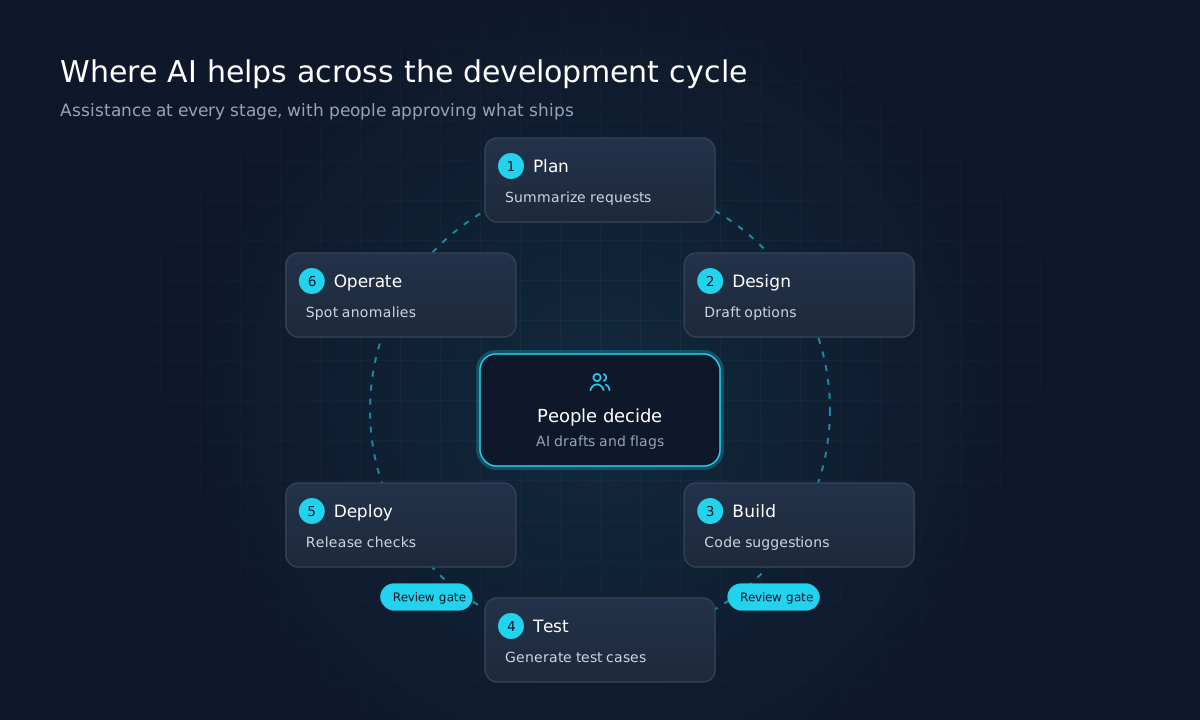
| Stage | How AI can help | Where people stay essential |
|---|---|---|
| Plan | Summarize requests, cluster feedback, draft user stories | Prioritizing by business value |
| Design | Generate layout options, draft copy, propose data models | Judging fit with users and brand |
| Build | Suggest code, explain legacy code, refactor | Architecture, security, code review |
| Test | Generate test cases and test data | Deciding what must never break |
| Deploy | Summarize changes, check release notes | Approving releases |
| Operate | Spot anomalies in logs, summarize incidents | Diagnosing root causes, communicating |
For businesses commissioning software, the takeaway is not that projects should cost dramatically less. It is that capable teams can spend less time on boilerplate and more on understanding your problem, testing thoroughly and getting details right. Be wary of any partner whose pitch is mostly about how much code AI writes for them.
Practical AI use cases in business software
The most reliable intelligent software solutions today handle well-defined tasks on unstructured information. Common examples:
- Document processing. Extracting fields from invoices, purchase orders, applications or contracts and entering them into the right system.
- Request triage. Reading incoming emails or support tickets, classifying them by type and urgency, and routing them to the right team.
- Search over internal knowledge. Letting staff ask questions of policies, manuals and past tickets, with answers that cite the source documents.
- Drafting. Preparing first drafts of routine replies, quotes, product descriptions or reports for a person to review and send.
- Summarization. Condensing long threads, call notes or documents into key points and action items.
- Data cleanup. Standardizing inconsistent records, such as company names or addresses, before migration or analysis.
What these share is a clear input, a clear output and a way to check the result.
Automation first, AI where it adds value
Not every automation needs AI. Many valuable improvements are plain business workflow automation: when an order is approved, create the invoice; when stock drops below a threshold, notify purchasing; when a form is submitted, create a CRM record.
Rules-based automation is predictable, cheap to run and easy to audit. Use it wherever the logic is stable and the inputs are structured.
AI earns its place when inputs are messy or variable, such as free-text emails, scanned documents or customer requests phrased a hundred different ways. The best systems combine both: AI interprets the unstructured input, rules decide what happens next.
Designing automation with a human in the loop
The most important design decision is what happens when the AI is unsure.
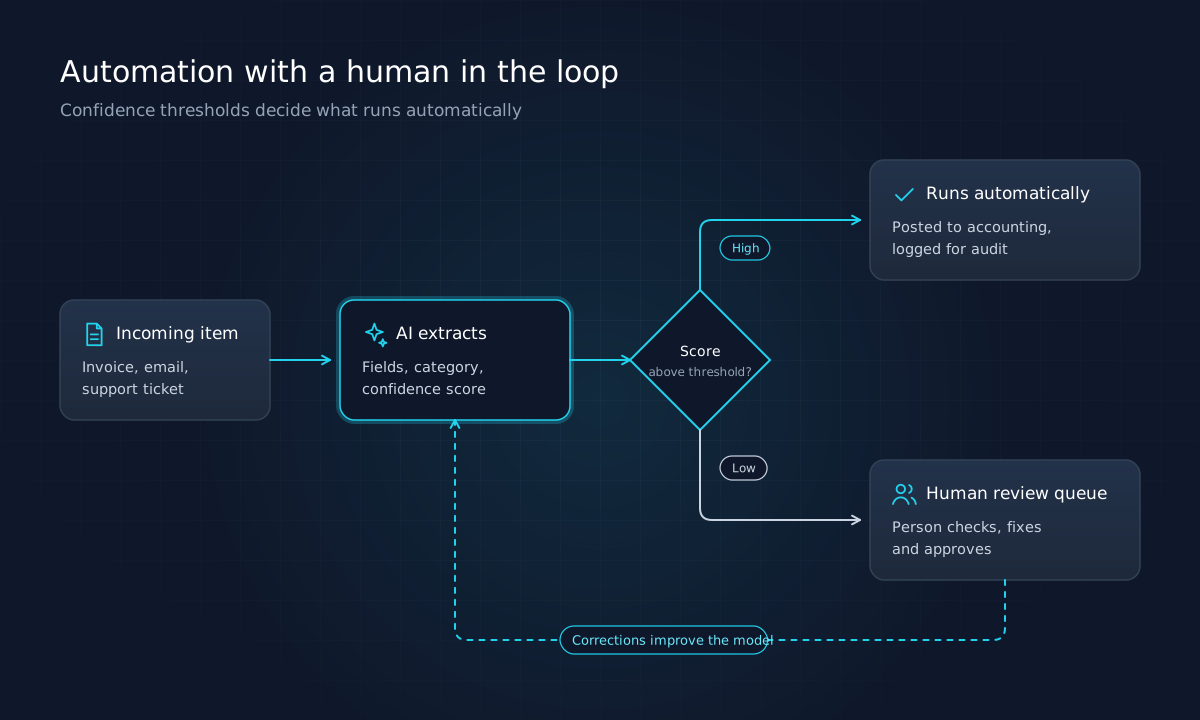
A well-designed workflow:
- Captures a confidence signal for each result, from the model or from validation rules.
- Automates only above a threshold you choose, based on the cost of an error.
- Routes everything else to a person with the AI's suggestion pre-filled, so review is quick.
- Logs every decision for audit and troubleshooting.
- Feeds corrections back to refine prompts, rules or models over time.
Start with a conservative threshold. As measured accuracy improves, you can automate more. This approach delivers savings early while keeping risk under control.
Risks to manage
AI introduces specific risks that conventional software does not. Plan for them from the start.
- Incorrect output. Language models can produce plausible but wrong answers. Constrain tasks, ground answers in your own data and require review where errors are costly.
- Data privacy. Understand what data is sent to which provider, how it is retained and whether it may be used for training. Use business agreements, minimize data and consult advisers for regulated information.
- Security. AI features can be manipulated by malicious input, for example instructions hidden in a document. Treat model output as untrusted, limit what automated actions can do and keep permissions narrow.
- Bias and fairness. Models can reflect biases in their training data. Avoid fully automated decisions that significantly affect people, such as hiring or credit, without careful review and legal guidance.
- Cost drift. Usage-based pricing can grow quickly. Monitor consumption and set budgets.
- Vendor dependence. Design so that the model provider can be changed without rebuilding the application.
Frameworks such as the NIST AI Risk Management Framework offer a structured way to think about these risks, even for smaller organizations.
How to start: a sensible first AI project
The best first project is narrow, frequent and measurable.
- Pick one workflow with high volume and a clear definition of a correct result, such as classifying incoming support tickets.
- Measure the baseline: volume, time per item and current error rate.
- Build a small pilot that suggests results for people to accept or correct, without acting automatically.
- Measure agreement between the AI's suggestions and human decisions over a few weeks.
- Automate the high-confidence cases once accuracy is proven, keeping review for the rest.
- Review regularly and expand to the next workflow only when the first is stable.
This approach also makes the business case clear. You will know exactly how much time the automation saves and how often it needs correcting.
Questions to ask before adopting an AI feature
Whether you are evaluating a vendor's AI add-on or scoping a custom feature, these questions separate useful tools from expensive experiments:
- What exact task does it perform, and how is a correct result defined?
- What happens when it is wrong? Who notices, and how is the error corrected?
- What data does it need, where is that data sent and how long is it kept?
- Can we see why it made a decision, or at least which source documents it relied on?
- How is accuracy measured over time, and who is responsible for reviewing it?
- What does it cost at our volume, including usage-based fees that grow with adoption?
- Can we switch it off or replace it without disrupting the rest of the workflow?
If a vendor cannot answer these clearly, the feature is not ready for a business-critical process. If you are building in-house, the same questions belong in the project brief.
What this means for your software roadmap
AI application development is most successful when it builds on solid foundations. AI works best on clean, connected data, inside applications with good access controls and logging. If your information still lives in disconnected spreadsheets, the first step may be connecting systems rather than adding AI. Our article on digital transformation for small businesses covers that progression.
When the process itself is distinctive, AI features are often part of a broader custom system. Our guide to custom software development explains when tailored software pays off, and our article on cloud migration covers the infrastructure that AI services typically rely on.
The bottom line
AI is a powerful tool for specific jobs, not a strategy in itself. Use rules-based automation for predictable work, apply AI where inputs are messy, design every workflow with human review for uncertain cases, and measure the results against a baseline. Start small, prove value, then expand.
Innovix Solutions builds automation and AI features into business applications as part of our custom software development work, supported by cloud and IT consulting for secure, well-managed infrastructure.
Frequently asked questions
Developers use AI assistants to suggest code, explain unfamiliar code, generate tests and draft documentation. Inside business applications, AI is used for tasks such as classifying requests, extracting data from documents, summarizing text and searching internal knowledge.
If a task follows clear, stable rules, conventional automation is usually cheaper and more predictable. AI is useful when inputs are unstructured or variable, such as emails, documents or free-text requests, and some judgment is required.
It depends on the provider, the plan and your configuration. Review data retention and training policies, use business or enterprise agreements where available, limit the data sent to what the task needs, and involve legal or compliance advisers for sensitive information.
Design for review. Use confidence thresholds to route uncertain cases to people, log decisions, sample automated outcomes regularly and measure error rates against a baseline. Treat the system as something that needs ongoing monitoring.
A contained, high-volume task with clear success criteria and low cost of occasional errors, such as routing support tickets, extracting fields from invoices or drafting standard responses for human approval.